URL parsing is the foundation of every successful web scraping project. When you're extracting data from hundreds or thousands of pages, you need to systematically break apart each URL into its components to navigate pagination, handle query parameters, and avoid duplicate requests. Without a structured approach to parsing URLs, your scraper will miss pages, collect redundant data, or break entirely when a site changes its URL patterns.
This guide walks you through the practical steps of building URL parsing into your web scraping workflow, from initial setup to handling edge cases. Whether you're a web developer building a custom crawler or a data analyst pulling product listings, these techniques will save you hours of debugging and produce cleaner datasets.
Key Takeaways
- Break every scraped URL into scheme, host, path, and query parameters before processing.
- Use established libraries like Python's urllib.parse instead of writing regex from scratch.
- Normalize URLs early to prevent duplicate page requests and wasted bandwidth.
- Extract and manipulate query parameters to automate pagination and filtering logic.
- Always handle encoding, fragments, and edge cases to build robust scraping pipelines.
Step 1: Understand URL Structure Before You Scrape
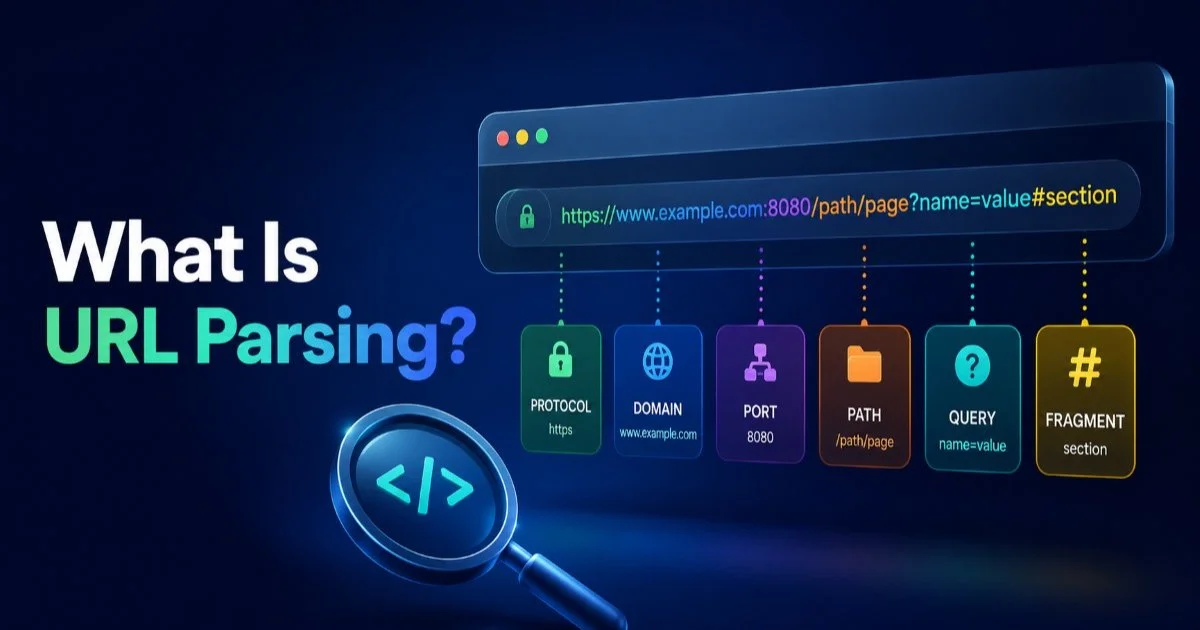
Before writing a single line of scraping code, you need to understand how URLs are constructed. Every URL you encounter follows a standard structure defined by RFC 3986, and recognizing each piece helps you predict how a website organizes its content. If you're new to this topic, the explanation of what URL parsing is and how it works provides a solid starting point. Think of a URL as a map: the scheme tells you the protocol, the host identifies the server, the path points to a resource, and the query string carries parameters that modify the response.
Anatomy of a Scraped URL
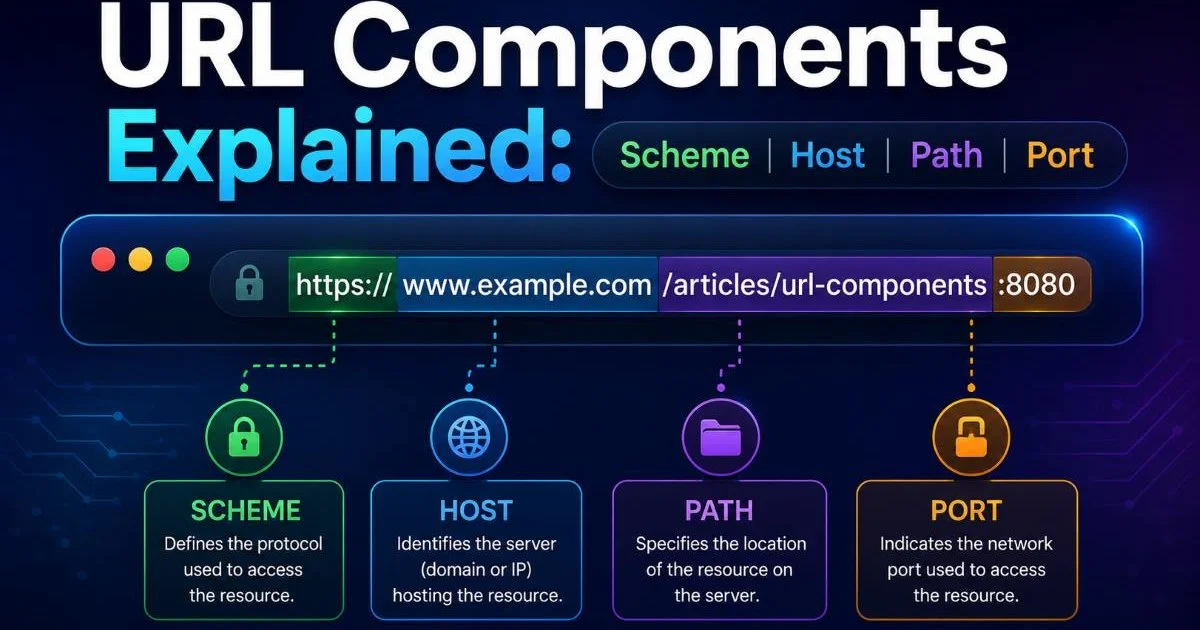
Consider a typical e-commerce URL: https://shop.example.com/products/shoes?category=running&page=3&sort=price_asc#reviews. The scheme is https, the host is shop.example.com, and the path /products/shoes tells you which resource is being requested. The query string contains three parameters that control filtering, pagination, and sorting. The fragment #reviews points to a specific section of the page. For a deeper breakdown of these elements, the guide to URL components including scheme, host, path, and port covers each piece in detail.
Understanding this structure matters because most websites use predictable URL patterns. Category pages often share the same path with different query parameters. Product pages typically embed an ID in the path. Search results append the search term as a query parameter. When you recognize these patterns, you can programmatically generate URLs for every page you need to scrape rather than discovering them through slow link-following.
Fragments (the # part) are almost never sent to the server, so you can safely strip them when deduplicating scraped URLs.
Step 2: Set Up Your URL Parsing Tools
Choosing the Right Library
The language you choose for web scraping will determine which parsing library you reach for. Python dominates the scraping landscape, and its standard library includes urllib.parse, which handles URL decomposition and reconstruction without any external dependencies. For more complex work, the furl library provides a fluent API for manipulating URL components. A comprehensive walkthrough of Python URL parsing libraries and practical examples will help you pick the right tool for your project's complexity.
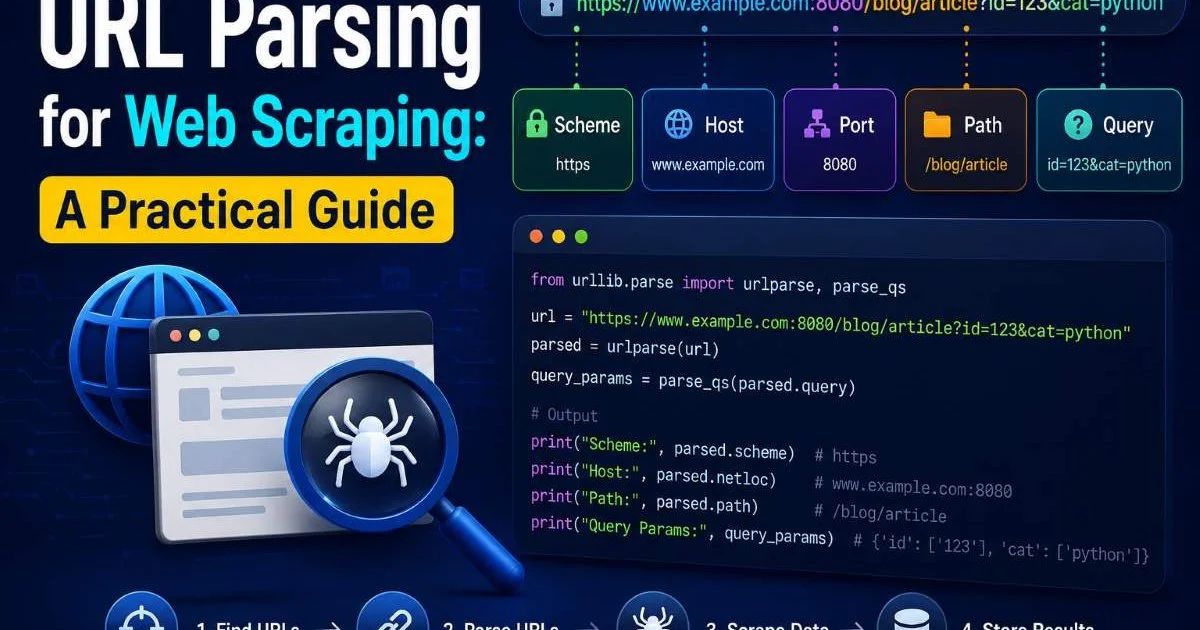
In Python, the urlparse() function returns a named tuple with six components: scheme, netloc, path, params, query, and fragment. You can then pass the query string to parse_qs() to get a dictionary of parameter names and values. This two-step process gives you full control over every part of the URL. For JavaScript-based scrapers using Node.js, the built-in URL class and URLSearchParams object provide equivalent functionality with a slightly different API.
Avoid the temptation to parse URLs with regular expressions. While regex can extract parts of simple URLs, it fails on edge cases like encoded characters, IPv6 addresses, usernames in URLs, and unusual port numbers. Standard libraries handle all of these correctly because they implement the full RFC specification. Regex-based parsing also becomes a maintenance burden when you need to reconstruct modified URLs later in your pipeline.
For production scraping systems that process millions of URLs, consider tools that offer batch parsing capabilities. If you need quick validation during development, the parser at urlparser.dev lets you visually inspect URL components. Pair this with a reliable web scraping API for real-time data when you need to handle JavaScript-rendered pages or rotate proxies alongside your parsing logic.
Never use string splitting (like split("?") or split("&")) to parse URLs in production. These approaches silently break on encoded characters and edge cases.
Step 3: Parse URLs for Pagination and Navigation
Handling Query Parameters for Page Control
Pagination is where URL parsing delivers the most immediate value in web scraping. Most websites encode page numbers as query parameters, such as ?page=1, ?offset=20, or ?start=40. By parsing the URL of the first results page, you can identify the pagination parameter and programmatically generate URLs for every subsequent page. This approach is far more reliable than clicking "Next" buttons, which may rely on JavaScript or change their HTML structure between pages.
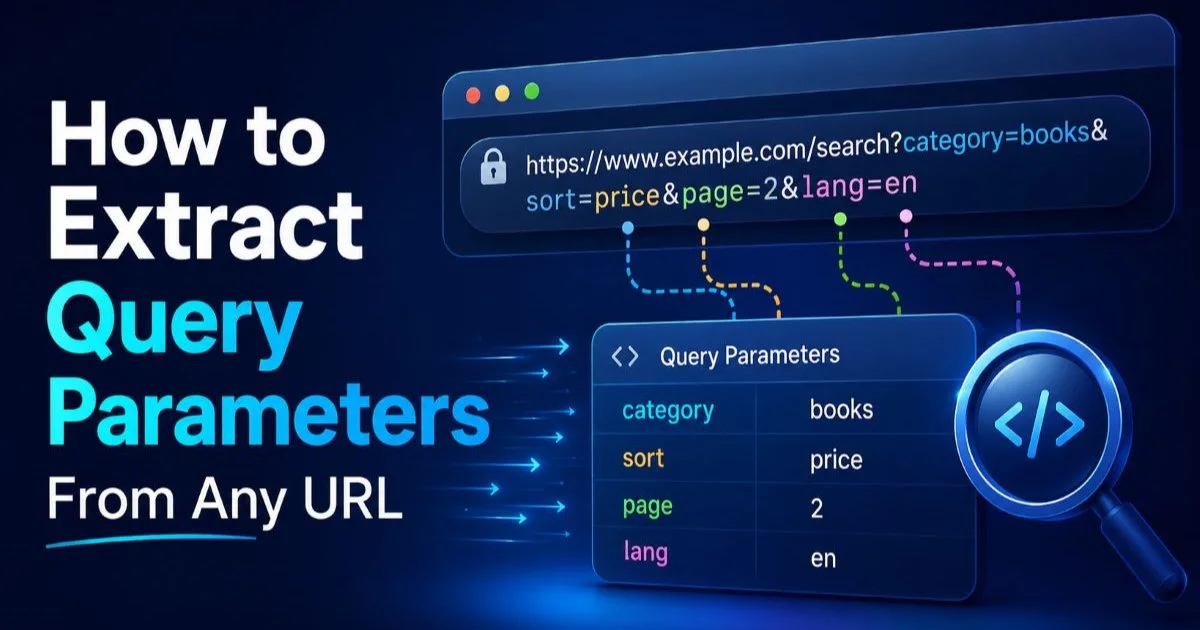
The detailed guide on how to extract query parameters from any URL explains the mechanics of pulling these values apart. In practice, you'll parse the initial URL, extract the page parameter, then use a loop to increment its value and reconstruct the URL. Python's urlencode() and urlunparse() functions handle the reconstruction, properly encoding any special characters in the process.
"The difference between a fragile scraper and a robust one usually comes down to how well it handles URL manipulation."
Some sites use path-based pagination instead of query parameters. You'll see patterns like /products/page/3 or /results/offset/40. In these cases, you need to parse the path segments, identify which segment represents the page number, and modify it directly. Python's PurePosixPath or simple string operations on the parsed path component work well here. Always examine the first few pages manually to confirm the pattern before automating.
Sorting and filtering parameters add another layer of complexity. A URL like ?category=electronics&brand=samsung&sort=price&order=asc&page=2 carries state beyond just the page number. Your scraper needs to preserve all non-pagination parameters while incrementing the page value. Parse all query parameters into a dictionary, modify only the pagination key, then rebuild the query string. This ensures you stay within the same filtered result set across all pages.
Cursor-based pagination (common in APIs) returns a token for the next page rather than a numeric offset. You must parse and store this token from each response.
Step 4: Normalize and Deduplicate URLs
Common Normalization Rules
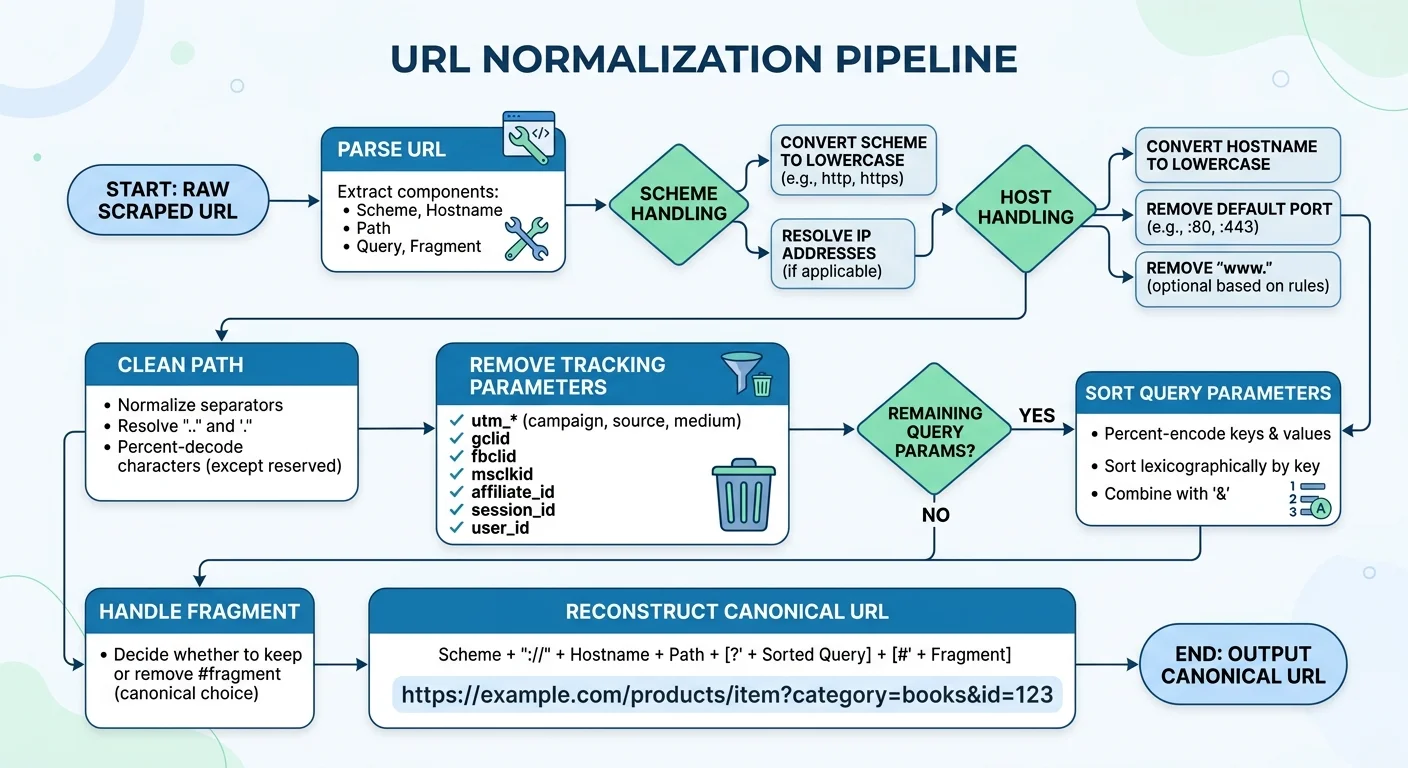
URL normalization is the process of converting different URL variations into a single canonical form. Without this step, your scraper will treat https://example.com/page?a=1&b=2 and https://example.com/page?b=2&a=1 as different pages, even though they return identical content. Normalization also catches differences in trailing slashes, URL encoding, and scheme casing. For large scraping jobs, deduplication alone can reduce your request count by 15 to 30 percent.
Start with these normalization rules: convert the scheme and host to lowercase, remove the default port (80 for HTTP, 443 for HTTPS), strip trailing slashes from paths, sort query parameters alphabetically, and decode unnecessarily encoded characters. Apply percent-encoding normalization so that %2F and / are handled consistently. Each of these steps requires parsing the URL into components first, making modifications, and then reassembling it.
Tracking parameters deserve special attention in scraping contexts. Many URLs contain parameters like utm_source, utm_medium, fbclid, gclid, and ref that affect analytics but not page content. Stripping these before deduplication prevents your scraper from fetching the same page multiple times through different referral links. Build a blocklist of known tracking parameters and remove them during the normalization step. Running a technical SEO audit scan on your target site can reveal which parameters affect content versus tracking.
Store normalized URLs in a set or a Bloom filter to efficiently check for duplicates before making requests. For small projects, a Python set works fine. For large-scale crawls involving millions of URLs, a Bloom filter provides constant-time lookups with minimal memory overhead at the cost of a small false-positive rate. Redis can serve as a shared deduplication store if you're running distributed scrapers across multiple machines.
Always normalize URLs before inserting them into your queue, not after fetching. This saves bandwidth and respects the target server's resources.
Frequently Asked Questions
?How do I extract query parameters for pagination using urllib.parse?
?Should I use regex or urllib.parse to parse scraped URLs?
?How much time does URL normalization actually save in a large scraping project?
?Will stripping URL fragments break my scraper on any sites?
Final Thoughts
URL parsing transforms web scraping from a brittle, manual process into a systematic operation that scales. By decomposing URLs into their components, you gain precise control over pagination, filtering, and deduplication.
The investment in proper parsing pays off immediately through fewer wasted requests and cleaner data. Build these techniques into your scraping pipeline early, and you'll spend less time debugging broken crawlers and more time analyzing the data you collected.
Disclaimer: Portions of this content may have been generated using AI tools to enhance clarity and brevity. While reviewed by a human, independent verification is encouraged.